

Setting up your workspace and staying comfortable while using two screens doesn’t have to be difficult. The best dual monitor stands make it easy to create an ergonomic setup and keep your desk neat and organized. With height, tilt, and swivel adjustments, you get the flexibility to work, study, or game without straining your neck or cluttering your space.
In this article, you’ll find the top dual monitor stands available, learn how these accessories can boost your productivity, and see how they add a cleaner, more modern look to your desk. With our recommendations, you’ll understand why a dual monitor setup is the perfect choice for optimizing your workspace with ease.
Deals of the Day
Page Contents
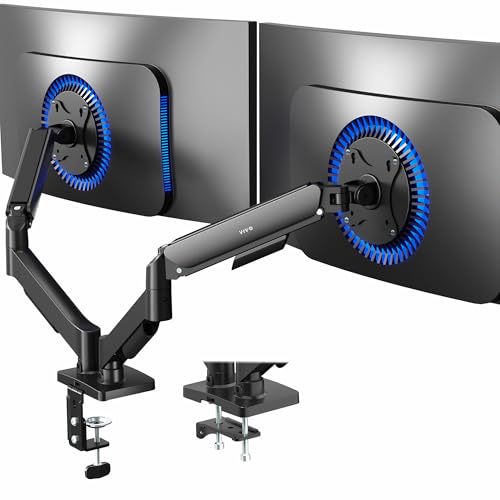
1. VIVO V0020 DUAL MONITOR
- Ultrawide Compatibility: Universally compatible wi…
- Mechanical Spring Adjustment: Toolless monitor pla…
- Articulation: The mounting brackets offer +90° to …

Let’s start with the VIVO V0020 Dual Monitor Stand, a model that stands out for its mechanical spring system. This feature makes it easy to raise or lower your screens without using tools, so you can adjust them several times throughout the day while keeping everything balanced and stable. It’s a comfortable option for anyone who spends long hours in front of a computer.
This stand is designed to hold both flat and curved screens up to 32 inches, with a weight range from 4 to 19 pounds per monitor. It’s compatible with VESA mounts of 75 by 75 millimeters and 100 by 100 millimeters, making it a versatile choice that works with many different models.
Another great benefit is its versatile mounting system, which helps free up desk space. It comes with a sturdy C-clamp base that fits tables up to 3.1 inches thick, and it also includes a grommet option for surfaces up to 2 inches thick. This flexibility makes it easy to adapt to different desk setups, whether at home or at the office.
One of its strongest points is the wide range of adjustments. You can tilt your screens 90 degrees up or down, swivel them 180 degrees to the sides, and rotate a full 360 degrees. This gives you complete freedom to place the monitors exactly how you need them, improving both comfort and ergonomics.
To keep things tidy, it includes a built-in cable management system along the arms, which reduces clutter and leaves your workspace looking clean and organized. All of this is supported by a robust alloy steel structure, offering durability and stability even with daily use.
Assembly is straightforward thanks to its intuitive design, with all the screws included and open-top VESA plates that let you slide the screens into place easily. This makes the setup quick and hassle-free, so you can start enjoying your dual monitor setup right away.
2. ERGEAR EGDS15B DUAL MONITOR STAND

- Computer Compatibility – To ensure compatibility o…
- Maximum Flexibility – The monitor stand features +…
- Height & Extension Adjustment – The dual monitor a…
Next up, we have the Ergear EGDS15B Dual Monitor Stand, designed for anyone who wants to work with two screens in a stable and comfortable way. It’s built to support monitors between 17 and 32 inches, with each arm holding up to 22 pounds. This makes it compatible with most models on the market, thanks to its VESA mounting system that works with both 75 by 75 millimeters and 100 by 100 millimeters.
One of its standout features is the gas spring technology, which allows for smooth and precise adjustments. This mechanism has been tested for more than 20,000 cycles, ensuring durability and making it easy to reposition your screens throughout the day without any effort.
The stand offers a wide range of motion. You can tilt your monitors 90 degrees upward or 35 degrees downward, swivel them 90 degrees to each side, and rotate them a full 360 degrees. This flexibility makes it simple to switch between landscape and portrait orientation, which is especially useful for work or entertainment.
When it comes to ergonomics, the arms provide height adjustment up to 17.5 inches above the desk and an extension forward of 15.5 inches. This helps keep your monitors closer to eye level, reducing strain on your neck and shoulders while promoting a healthier posture during long hours at the desk.
Installation is flexible and adapts to different desks. It includes a sturdy C-clamp base that fits surfaces up to 2.5 inches thick, or you can use the grommet option, which works with tops up to 2.1 inches. Both choices are secure and easy to set up.
To keep your workspace tidy, it has integrated cable management channels built into the arms, preventing clutter and keeping wires organized. Combined with its solid alloy steel frame, this stand delivers strength, stability, and reliability even under heavy daily use.
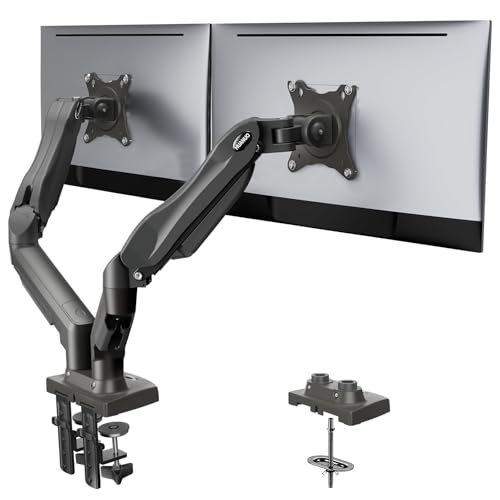
3. HUANUO DUAL MONITOR

- Compatibility: To ensure compatibility with the du…
- Customize Your Viewing Angle: The Huanuo dual moni…
- Taller Height Adjustment: Featuring a tall 13″ col…
Let’s continue with the HUANUO Dual Monitor Stand, a practical option for anyone who wants to work with two screens while keeping things stable and comfortable. It’s built to hold monitors between 13 and 32 inches, with each arm supporting up to 19 pounds, all on a solid steel frame that feels sturdy and reliable even with daily use.
This stand gives you a full range of motion. You can tilt your screens 90 degrees up or 35 degrees down, swivel them 180 degrees to each side, and rotate a full 360 degrees. That flexibility makes it easy to find the perfect angle whether you’re working, gaming, or multitasking. It also helps reduce eye strain and neck discomfort, letting you sit in a more natural position for longer periods of time.
The central pole has a height of 13 inches, and combined with the adjustable arms, it allows your monitors to be raised up to 20.8 inches above the desk. This makes a big difference for ergonomics, helping you keep your screens at eye level and encouraging better posture. The reinforced steel construction, tested over 20,000 motion cycles, ensures strength and durability even with frequent adjustments.
Setup is straightforward and adapts well to different types of desks. It includes two mounting options: a sturdy C-clamp base that works with tabletops up to 3.1 inches thick, or a grommet mount for surfaces up to 3.3 inches thick. Both choices are secure and simple to install, making the process quick and hassle-free.
On top of that, it comes with a built-in cable management system along the arms and the central pole. This keeps cords organized and the desk looking neat, giving your workspace a cleaner and more professional appearance. With its mix of ergonomics, ease of use, and modern design, this stand is a great pick for getting the most out of a dual monitor setup.
4. VIVO V002 DUAL MONITOR

- Fits 13″ to 30″ Screens – Dual monitor mount fitti…
- Articulation & Height Adjustment – Adjustable arm …
- Heavy Duty C-Clamp – Mounts to the back of your de…
Now let’s move on to the VIVO V002 Dual Monitor Stand, a solid choice for anyone who wants more comfort and better organization when working with two screens. This model supports monitors between 13 and 30 inches, each weighing up to 22 pounds, thanks to its strong steel frame that provides excellent stability and safety.
It offers a wide range of motion, allowing you to tilt the screens up or down, swivel them side to side, and even rotate a full 360 degrees. The height can also be adjusted along the central pole, making it easy to find the perfect angle whether you’re working, gaming, or just relaxing with some entertainment.
The mounting system is very versatile, with a durable C-clamp base that fits desks up to 3.2 inches thick, and it also comes with a grommet option for surfaces up to 3.1 inches. Setup is straightforward thanks to its removable VESA plates, included screws, and clear instructions, so you can have everything ready in no time without frustration.
Another useful feature is the built-in cable management system on the arms and central pole. This keeps cords organized, reduces clutter, and makes your desk look cleaner. The 18-inch pole gives plenty of room to raise the monitors higher, improving posture and helping to reduce strain on your neck and back, which makes long hours at the desk much more comfortable.
As an added bonus, it comes with a 3-year warranty and reliable technical support, giving you peace of mind and help if you ever need it. Altogether, it’s a complete solution that not only improves organization but also enhances the overall experience of using two monitors every day.
5. ERGEAR EGCM1 DUAL MONITOR STAND

- Computer Compatibility – To ensure compatibility o…
- Versatile Compatibility – With a 30.71“ wide arm s…
- Flexible Screen Positioning – Experience ultimate …
Finally, the Ergear EGCM1 Dual Monitor Stand is a great choice for anyone who needs to work or play with two screens at the same time without losing comfort or desk space. It can hold monitors between 13 and 32 inches, each weighing up to 17 pounds, supported by a sturdy metal frame that delivers strength and stability all day long.
This stand gives you plenty of flexibility. You can swivel the arms 90 degrees to each side, tilt the screens 45 degrees up or down, and rotate them a full 360 degrees. The smooth motion makes it easy to keep a natural posture, which helps reduce neck strain and eye fatigue when you’re sitting at your desk for hours.
Its design features a central pole that’s 16 inches tall, along with arms that extend up to 30 inches wide, letting you arrange larger screens comfortably. At the same time, it raises the monitors to eye level, clearing desk space and creating a more organized look. To keep things even tidier, it includes cable clips on both the arms and the central pole, so cords stay out of the way.
Assembly is straightforward, thanks to a clear illustrated manual and labeled parts. You also get two mounting options: a reliable C-clamp base that works with desks up to 3.1 inches thick, or a grommet mount compatible with surfaces up to 2 inches thick. That way, it adapts easily to different setups.
Made from steel and lightweight alloy, it balances durability with easy handling, keeping your screens stable and secure. This makes it an excellent solution for professionals who rely on multiple displays, as well as gamers or multitaskers, offering ergonomics, adaptability, and a much cleaner workspace.
More deals of the day



Thank you for joining us in exploring the best dual monitor setup. We hope this guide has been helpful in finding the monitor stand that best fits your daily needs. With a wide range of options known for their performance and flexibility, we’re confident you’ll find the perfect dual monitor setup to boost your productivity and keep your workspace organized without spending too much.
Remember that at TechLife, you can explore detailed reviews of other PCs, tablets, and components. We encourage you to discover our different sections to improve your daily life with innovative and high-quality tech gear.
Visit us soon to find new buying guides, useful tips, and recommendations on a variety of products. We are here to help you make informed decisions and ensure that your shopping experience is as easy and satisfying as possible.