
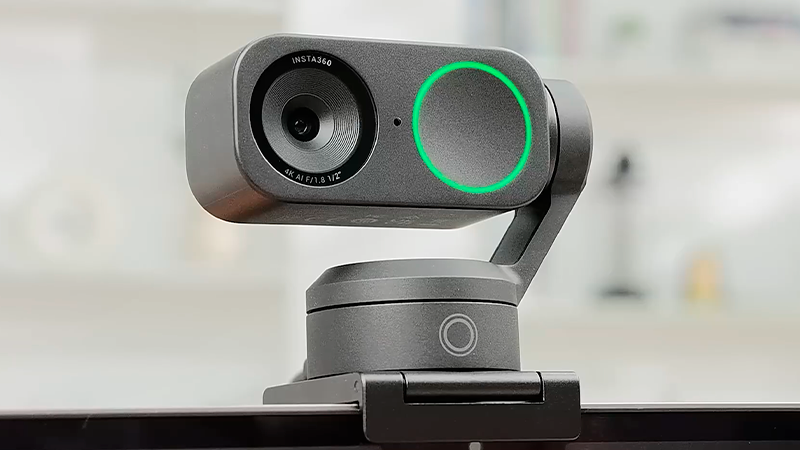
Today, webcams have become an essential tool for staying connected in a digital world. Whether you are working remotely, attending online classes, or joining virtual meetings, having a reliable camera makes a noticeable difference. Modern options go beyond basic video, offering sharper image quality, clearer audio, and automatic adjustments that help you look and sound better without extra effort.
In this guide, you will discover the best webcams for streaming, work, and video calls, learn how they can improve your on-screen presence, and understand why choosing a quality model can enhance both professional and personal communication.
Deals of the Day
Page Contents
1. INSTA360 LINK 2C WEBCAM

- Premium Image Quality: Upgrade to Link 2C 4K webca…
- Professional Audio: Experience best-in-class audio…
- True Focus: Insta360 Link 2C streaming camera with…

Let’s start with the INSTA360 LINK 2C WEBCAM, a smart and powerful solution for anyone who wants top-tier image quality without dealing with complicated settings. This option is designed for users who value a smooth, modern experience and want to look their best on camera from the very first moment.
One of the first things you notice is the sharp 4K video quality, delivering a highly detailed image with natural-looking colors. The wide dynamic range helps balance highlights and shadows, which makes a big difference in rooms with uneven lighting. Even in low-light environments or late-night sessions, the picture stays clear, soft, and easy on the eyes.
Sound quality also plays a key role, thanks to artificial intelligence noise cancellation. This feature minimizes background distractions like keyboard clicks, fans, or nearby conversations, keeping your voice front and center. It works especially well for work meetings, online classes, and presentations, where clear audio really matters.
The fast and accurate autofocus reacts in milliseconds when you move. Whether you lean closer, step back, or show an object to the camera, the image stays crisp and stable. This makes interactions feel more natural for everyone watching.
A standout feature is the natural bokeh effect, which gently blurs the background while keeping your face sharp. This creates a more professional look, reduces visual clutter, and helps maintain focus during important calls or recordings.
The automatic framing system adjusts the view to keep people centered in the shot. It works smoothly with one person or multiple participants, making it ideal for dynamic meetings or active learning environments.
You also get gesture controls and mobile control, allowing you to zoom, switch modes, or activate features without touching the camera. Special modes like desk view, whiteboard mode, and vertical portrait make it easy to adapt to work, teaching, or content creation with flexibility and confidence.
2. NEXIGO N60 WEBCAM

- 【Full HD 1080P Webcam】Powered by a 1080p FHD two-M…
- 【Wide Compatibility】Works with USB 2.0/3.0, no add…
- 【Built-in Noise-Cancelling Microphone】The built-in…
Next up, we have the NEXIGO N60 WEBCAM, a simple and reliable option for anyone who wants clear video without dealing with extra setup. This solution is made for users who want to look sharp right away and keep things easy from the start.
This model delivers Full High Definition 1080 pixel video, offering a clean and natural image for video calls, online classes, or live streams. The built-in sensor handles indoor lighting well and keeps a steady focus from about 20 inches up to 13 feet, so whether you are close to the screen or sitting farther back, the picture stays clear and well defined.
One of its strongest features is the wide 110-degree field of view, which lets you show more of your space without constantly adjusting the camera. This is especially helpful for meetings, presentations, or moments when you want more than just your face on screen. You can also fine-tune the framing using digital zoom and angle adjustments, making it easier to adapt to different situations.
For audio, it includes a noise-reducing microphone designed to lower background sounds from your environment. This helps your voice come through louder and clearer during work calls, virtual lessons, or live broadcasts, improving the experience for everyone listening.
It also comes with a physical privacy cover, a small but important feature that protects the lens when the device is not in use. This adds peace of mind at home or in professional settings.
Setup is plug and play, connecting through USB and ready to use in under 1 minute, with no software or drivers required. It works smoothly with Windows, macOS, Linux, and other common systems. The lightweight design and adjustable mount make it easy to place on monitors or tripods, helping you find a comfortable and natural angle for any workspace.
3. LOGITECH C920E WEBCAM

- With a 78° fixed field of view, the C920e webcam d…
- The C920e webcam features two integrated omnidirec…
- Built-in HD autofocus ensures you’re seen clearly …
Let’s continue with the LOGITECH C920E WEBCAM, a dependable choice built for everyday professional use, ideal for anyone who needs consistent performance, solid image quality, and reliable audio without constant adjustments.
This business-focused option offers a 78-degree field of view, creating a balanced frame that works perfectly for one person on screen. It provides a natural look while leaving enough space to show documents, small objects, or hands-on projects, all without distortion or distracting angles during meetings.
When it comes to sound, it features dual omnidirectional microphones that capture your voice clearly from up to 3.3 feet away. This allows you to speak in a normal tone, even if you move slightly, while keeping audio clean and easy to understand during meetings, interviews, or virtual classes.
The high-definition video with automatic focus stays sharp at all times. If you change position or move in front of the camera, the focus adjusts smoothly on its own. On top of that, automatic light correction balances brightness when lighting conditions are not ideal, helping you look clear in dim rooms or spaces with uneven light, without needing extra lamps.
A built-in privacy cover adds an extra layer of security by letting you block the lens when it is not in use. With a simple motion, you can instantly confirm whether the camera is active, offering peace of mind at work or at home.
This model is Zoom certified and works smoothly with Microsoft Teams and other popular platforms, ensuring stable compatibility in professional environments. The sturdy adjustable clip fits monitors and laptops, and the standard one quarter inch tripod mount makes positioning easy. The Sync software also helps manage devices efficiently, whether in the office or while working remotely.
4. ANKER C200 WEBCAM

- 2K Ultra-Clear Resolution: Enjoy sharp, detailed v…
- Advanced Audio Clarity with AI Noise Cancellation:…
- Superior Low-Light Performance: This webcam captur…
Now let’s move on to the ANKER C200 WEBCAM, a smart option for anyone looking to step up visual quality without dealing with complicated setups or wasting time before each call.
Right from the start, this solution stands out with its 2K video resolution, showing your face with noticeably more detail and clarity. This upgrade is especially noticeable during important meetings or presentations, where a sharper image helps create a more professional and polished look, whether you are working remotely or attending online classes.
On the audio side, it features dual microphones with artificial intelligence noise cancellation. This system reduces common background sounds like keyboard typing, street noise, or nearby conversations, allowing your voice to come through clean, focused, and easy to understand. It is a strong advantage for interviews, virtual meetings, or live sessions where clear communication matters.
Another highlight is its strong low-light performance. The camera automatically adjusts brightness and exposure so the image does not look dark or dull, even in offices with uneven lighting or during late-night use. This removes the need for extra lights and keeps video quality consistent across different environments.
The adjustable field of view lets you choose between 65, 78, or 95 degrees, depending on what you want to show. You can keep the frame tight on your face or widen it to include more space, making it flexible for solo calls, team meetings, or product demos.
An integrated sliding privacy cover easily blocks the lens when not in use, adding peace of mind against accidental activation. This is especially useful in shared spaces or home offices.
With wide compatibility on Windows and macOS, it works as soon as you plug it in, without complicated installs. Its compact design and adjustable base make it easy to place on monitors, laptops, or stands, helping you quickly find a comfortable and natural angle for daily calls or recordings.
5. LOGITECH BRIO 101 WEBCAM

- Compatible with Nintendo Switch 2’s new GameChat m…
- Auto-Light Balance: RightLight boosts brightness b…
- Built-In Mic: The built-in microphone on this webc…
Finally, the LOGITECH BRIO 101 WEBCAM is a practical choice for anyone who wants to look good on camera without effort or time-consuming adjustments. From the very first use, it shows a clear focus on comfort, simplicity, and reliable everyday performance, making it easy to jump into calls with confidence.
This model delivers Full High Definition 1080 pixel video, helping your face appear clear and natural during meetings, online classes, or personal video calls. The image quality stays consistent and balanced, even when used in different rooms or connected to various compatible devices, which makes it dependable for daily use.
One of its most useful features is RightLight technology, which automatically adjusts brightness and can increase it by up to 50 percent. This helps reduce shadows and balance lighting when a room is not well lit, creating a more even and pleasant image without needing extra lights or manual tweaks.
For audio, it includes a built-in microphone that captures your voice in a clear and understandable way. This makes it convenient for work meetings, interviews, or everyday calls, removing the need for external microphones while keeping communication smooth on common platforms.
Another interesting detail is its compatibility with Nintendo Switch 2 GameChat mode, which is great for online gaming sessions where both image and sound matter, all handled through a single device.
The plug and play setup keeps things simple. Just connect it using Universal Serial Bus, and it is ready in seconds, with no drivers to install. It works smoothly with popular video calling apps on both laptops and desktop computers.
A sliding physical privacy cover lets you block the lens when not in use, adding security and peace of mind. The compact and lightweight design fits easily on monitors or laptops, allowing quick angle adjustments for a comfortable and natural daily setup.
More deals of the day





Thank you for joining us in exploring the best webcams for streaming, work, and video calls. We hope this guide helped you find the webcam that best fits your daily needs. With a wide range of options highlighted for their image quality and ease of use, we’re confident you’ll discover the perfect webcam to look and sound your best in every online meeting or call.
Remember that at TechLife, you can explore detailed reviews of other camera and accessory products. We encourage you to discover our different sections to improve your daily life with innovative and high-quality photography gear.
Visit us soon to find new buying guides, useful tips, and recommendations on a variety of products. We are here to help you make informed decisions and ensure that your shopping experience is as easy and satisfying as possible.