
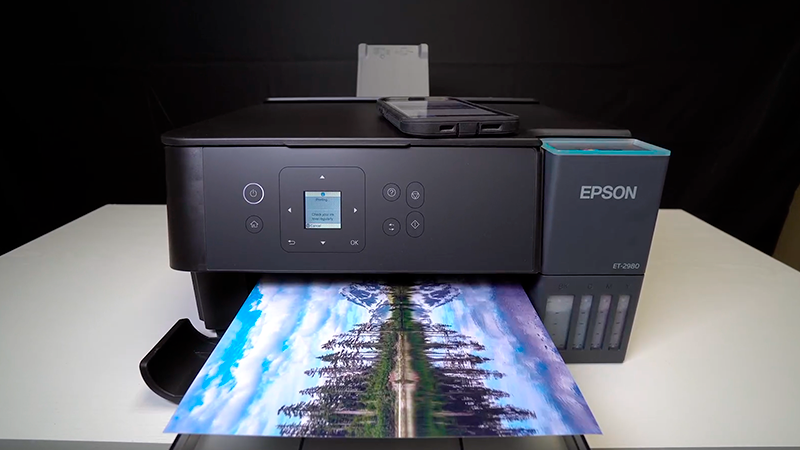
Having a reliable home printer makes it easy to handle documents, school assignments, photos, and copies without leaving the house. From affordable ink tank models to fast laser options and wireless all-in-one machines, today’s printers are designed to simplify everyday tasks while helping reduce the cost of replacement ink or toner.
In this guide, you’ll discover the best home printers available and learn which features can improve printing, scanning, and copying. Our recommendations will help you understand why a quality printer for home use can be a smart choice for students, families, and anyone working remotely.
Deals of the Day
1. BROTHER MFC-J4335DW PRINTER

- UP TO 1-YEAR OF INK IN-BOX¹ – Enjoy exceptional co…
- REVOLUTIONARY INKVESTMENT TANK TECHNOLOGY – Intern…
- COMPACT ALL-IN-ONE FUNCTIONALITY – Print, copy, sc…
Let’s start with the Brother MFC-J4335DW, a versatile home printer with fast performance, an automatic document feeder, and flexible paper handling.
It comes with 4 ink cartridges that can last up to 1 year, based on around 150 pages per month. That means you can start printing right away without needing to purchase extra ink anytime soon.
Brother’s INKvestment Tank system combines high-capacity, front-loading cartridges with internal ink storage. When a cartridge runs out, you simply remove it and insert a replacement. There are no bottles, measurements, or tanks to fill manually, making maintenance easier and helping prevent messy spills.
Speed is another major advantage. It prints up to 20 pages per minute in black and 19 in color, so school assignments, reports, and presentations won’t take forever. It also supports borderless photos and paper sizes up to 8.5 by 14 inches, including standard legal documents.
This all-in-one model can print, copy, scan, and fax while keeping a fairly compact design. Its automatic feeder handles up to 20 pages at once, while automatic 2-sided printing saves paper without requiring you to flip each sheet. The main tray holds 150 pages, and the additional feed slot works with envelopes, cardstock, and photo paper.
With Brother Mobile Connect, you can print documents and photos from your phone, scan files, make copies, and manage the machine through a simple app. You can also connect through Wi-Fi, Wi-Fi Direct, or a USB cable.
The Page Gauge estimates how many pages you can print before the ink runs out. It also works with Alexa, allowing you to receive low-ink alerts and optionally set up automatic cartridge reordering.
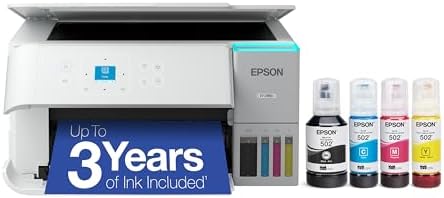
2. EPSON ECOTANK ET-2980 PRINTER
- LESS FREQUENT INK REPLACEMENT — Each replacement i…
- UP TO 3 YEARS OF INK INCLUDED IN THE BOX – Cartrid…
- SIMPLE INK REFILLING — Supersized ink tanks and un…
Next up, we have the Epson EcoTank ET-2980, a well-rounded home printer with automatic 2-sided printing and enough ink to keep going for years.
The included bottles can print up to 6,600 black pages and 5,500 color pages. Even better, each replacement set provides roughly the same output as about 90 traditional ink cartridges, which can greatly reduce long-term printing costs.
It’s also noticeably faster than entry-level EcoTank models. It reaches up to 15 pages per minute in black and 8 in color, and there’s almost no warm-up delay. That makes everyday documents, school assignments, and reports quicker to finish.
Automatic 2-sided printing is another convenient feature. It prints on both sides of the paper without making you flip each sheet by hand, helping save time and reduce paper use. The rear tray holds 100 pages and also works well with envelopes, photo paper, and other specialty media.
Print quality is strong for both documents and pictures. Text looks sharp, graphics stay detailed, and colors come out bright. It can also produce borderless 4-by-6-inch photos, making it a great option for albums, family memories, crafts, and school projects.
Refilling the tanks is simple. Epson’s EcoFit bottles use a different nozzle for each color, so they only fit into the correct tank. Just attach the bottle and let the ink flow—there’s no squeezing, measuring, or complicated setup.
You can print and scan wirelessly from phones, tablets, and computers. The Epson Smart Panel app makes it easy to send files and check the printer’s status. This compact model also works as a printer, scanner, and copier, with a 1.44-inch color display for handling its main functions.
3. HP SMART TANK 5101 PRINTER

- SET IT UP ONCE AND PRINT WITH CONFIDENCE. No compl…
- INK FOR YEARS. NOT MONTHS. Up to 2 years of ink in…
- KEEPS PRINTING WELL AFTER COMPETITORS HAVE QUIT. N…
Let’s continue with the HP Smart Tank 5101, a simple all-in-one printer that makes it easy to print, copy, and scan from home.
It comes with original HP ink bottles that can produce around 6,000 black pages and 6,000 color pages. Depending on how often it’s used, that supply can last up to 2 years. Since there are no traditional cartridges, the cost per page stays impressively low.
Refilling the tanks is straightforward. Place each bottle over its matching color port and let the ink drain automatically—there’s no squeezing or measuring required. The transparent windows make it easy to check the remaining supply, while a built-in sensor warns you when levels are getting low.
Besides printing, this model can scan and copy assignments, receipts, IDs, recipes, and photos. It produces sharp text and vibrant colors, and it supports borderless images up to 8.5 by 11 inches. Speeds reach 12 pages per minute in black and 5 in color, which is plenty for everyday home use.
Another interesting feature is HP AI, an optional tool that prepares websites and emails before printing. It can remove unwanted elements and fix awkward layouts so you don’t waste paper. Keep in mind that it requires Windows 11, internet access, and an HP account.
Its wireless connection can automatically detect and fix certain connectivity issues. Using the HP app, you can send files from a phone or computer, scan documents, and set up the machine without relying on cables.
The input tray holds 100 sheets, while the output tray collects up to 30. Illuminated buttons guide you through common tasks, and the compact design fits easily on a desk. It’s a strong choice for families and students who regularly print both documents and photos.
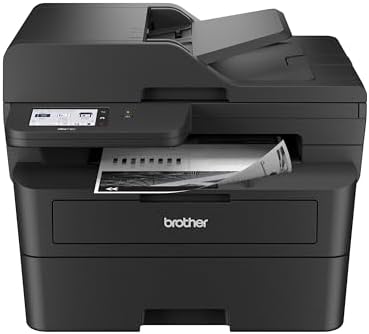
4. BROTHER MFC-L2900DW PRINTER
- Professional Performance: Elevate your business ef…
- Versatile Connectivity: Take command of your workf…
- Advanced Document Handling: Maximize productivity …
Now let’s move on to the Brother MFC-L2900DW, a fast and dependable laser printer built for handling large amounts of black-and-white documents.
Its biggest advantage is speed. It can produce up to 36 pages per minute, with dark, consistent, and easy-to-read text. It also gets started quickly, even after sitting in sleep mode, so you won’t spend much time waiting.
This model only prints in black and white, but it combines a printer, copier, scanner, and fax in one machine. Since it uses toner instead of liquid ink, the cartridge won’t dry out when the printer goes unused for several days. That makes it a reliable option for contracts, invoices, schoolwork, and reports.
Another major benefit is automatic 2-sided handling. It can print, copy, and scan both sides of a sheet without requiring you to flip it manually. The scanner captures the front and back in a single pass, which is especially useful for saving longer documents and reducing paper use.
The 50-page automatic document feeder can process a full stack continuously. Just load the pages and let the machine do the work. Its main paper tray also holds up to 250 sheets, so you won’t need to refill it constantly during larger jobs.
A 3.5-inch touchscreen provides clear menus and up to 18 customizable shortcuts. You can send scanned files to services like Google Drive, Dropbox, and OneDrive. Printing from phones and computers is also available through wireless, wired, and Brother Mobile Connect options.
Energy use is reduced by about 22%, while the starter toner prints roughly 700 pages. When it runs out, the printer supports the TN830XL high-yield cartridge, which can produce up to 3,000 pages and helps reduce how often the toner needs to be replaced.
5. EPSON ECOTANK ET-2800 PRINTER

- Keep your office running smoothly with the Epson E…
- Innovative Cartridge-Free Printing ? No more tiny,…
- Dramatic Savings on Replacement Ink ? Save up to 9…

Finally, we have the Epson EcoTank ET-2800, a practical choice for families that want to lower their ink costs without giving up color printing.
Its biggest selling point is the refillable ink tank system, which can reduce ink expenses by up to 90% compared with traditional cartridges. In fact, one set of replacement bottles provides roughly the same output as about 80 individual ink cartridges.
The page yield is equally impressive. Epson 522 ink bottles can produce around 4,500 black pages and 7,500 color pages. The printer also comes with enough ink for up to 2 years, based on an average of 125 pages per month. That makes it especially useful for busy households, families with kids, and students who print regularly.
This all-in-one model can print, copy, and scan. It’s useful for digitizing receipts, IDs, and forms, as well as producing assignments, everyday documents, and photos. Epson’s heat-free printing technology delivers sharp text, detailed graphics, and bright colors. It can even create borderless 4-by-6-inch photos, which are great for family memories and creative projects.
Wireless connectivity lets you print from a phone, tablet, or computer without plugging in a cable. With the Epson Smart Panel app, you can set up the printer, send documents, scan files, and check the remaining ink levels through a simple interface.
Print speeds reach up to 10 pages per minute in black and 5 in color, while the rear tray holds 100 sheets. The 1.44-inch display keeps the controls straightforward, although 2-sided printing must be done manually. Epson’s EcoFit bottles also make refilling easier, help prevent spills, and create far less plastic waste than constantly replacing small cartridges.
More deals of the day

Thanks for joining us as we explored the best home printers. We hope this guide helped you find the right printer for your everyday needs. With options known for their print quality, reliability, and affordable operating costs, we’re confident you’ll discover the ideal home printer for documents, schoolwork, photos, and remote work.
Remember that at TechLife, you can explore detailed reviews of other home gadgets. We encourage you to discover our different sections to improve your daily life with innovative and high-quality home technology.
Visit us soon to find new buying guides, useful tips, and recommendations on a variety of products. We are here to help you make informed decisions and ensure that your shopping experience is as easy and satisfying as possible.