
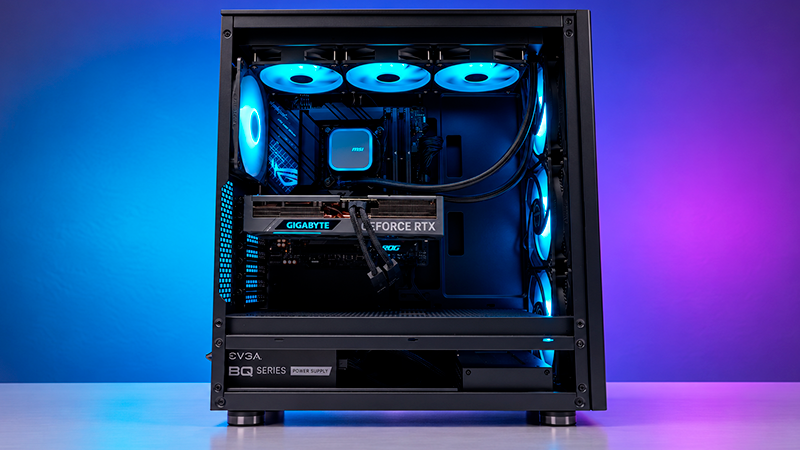
Gaming and demanding software can put your processor to work, making CPU temperature control an important part of your setup. AIO liquid coolers carry heat to a radiator, where fans help release it. Different sizes and adjustable settings let you match the cooling system to your computer’s needs.
This roundup covers some of the best AIO coolers, highlighting the features that matter when comparing options. We’ll look at radiator size, noise control, and compatibility to help you find a model that fits your PC and the way you use it.
Deals of the Day
1. MSI MAG CORELIQUID A13 360 AIO CPU COOLER

- LGA 1851 READY – The MAG CORELIQUID Series liquid …
- SPLIT-FLOW RADIATOR WITH INTEGRATED PUMP – The alu…
- The CORELIQUID A13 series is equipped with a high-…
Let’s start with the MSI MAG CORELIQUID A13 360 AIO CPU Cooler, which helps cool your processor while saving some work during installation. Its 3 fans come preinstalled and connect together, so there’s less assembly to handle and fewer individual cables to organize.
The 360 millimeter radiator releases heat collected from the processor during gaming or demanding work. That size matters when choosing a case. You’ll need one that supports a radiator this size, with enough clearance for the fans as well.
Here’s how it works. A pump moves liquid between the processor and the radiator, carrying heat away. The fans then push air through the radiator to help release that heat.
You can adjust fan speed to match what your computer needs. When you’re browsing websites or working on documents, they can run more slowly. During heavier tasks, you can increase airflow to handle the extra heat. That gives you a way to balance cooling and noise instead of running the fans at the same speed all the time.
Mounting hardware is included for certain Intel and AMD platforms. The Intel bracket comes ready to use and can be swapped for the AMD bracket. Just check that your motherboard’s processor socket, the mount that holds your processor, is supported before installation.
The flexible hoses make it easier to arrange everything inside the case. They use rubber with a braided nylon covering. According to MSI, that construction is intended to limit liquid evaporation and withstand temperature changes.
There’s room for customization, too. The cover on the processor block can be rotated or replaced. MSI provides files for making a custom cover with a 3D printer, so you can change its appearance to match your build while keeping the cooling hardware in place.
2. CORSAIR NAUTILUS 360 RS AIO CPU COOLER

- Simple, High-Performance All-in-One CPU Cooling: R…
- Efficient, Low-Noise Pump: Keeps your coolant circ…
- Convex Cold Plate with Pre-Applied Thermal Paste: …
Next up, we have the Corsair Nautilus 360 RS ARGB AIO CPU Cooler, designed to help manage processor heat during gaming and demanding work. This white version pairs a 360 millimeter radiator with 3 fans, so your case needs enough room for the complete assembly.
The fans adjust their speed through the motherboard, the main circuit board inside your computer. They can slow down during light tasks and speed up as temperatures rise. Their design also directs airflow toward the radiator, where heat is released.
Installation involves one less step because the thermal paste comes preapplied. That’s the thin layer between the processor and the cooler’s copper base that helps transfer heat. You don’t have to spread it yourself before securing the block. Mounting hardware is included for certain Intel and AMD platforms, but you’ll still need to check that your processor’s mounting socket is supported.
Cable management is straightforward, too. The fans connect to each other and share a connection for speed control. That means fewer separate cables to organize, and no extra cooling controller is required. It’s useful when you’re trying to keep the inside of your build tidy.
During lighter use, the fans can stop completely if your motherboard settings allow it. That helps reduce fan noise while you’re doing things like browsing or working on documents. Corsair lists 20 decibels for the pump, but that figure applies to the pump alone, not the total noise from the cooler or your computer.
The white finish gives the assembly a consistent look, while customizable lighting adds color to the block and fans. With a compatible motherboard, you can coordinate those colors and effects with other components. That lets you carry the same lighting theme across your build.
3. COOLER MASTER ML240L V2 AIO CPU COOLER
- 3rd Generation Dual Chamber Pump for overall cooli…
- New SickleFlow Refreshed exterior design for impro…
- RGB Lighting Signature cooling performance with an…
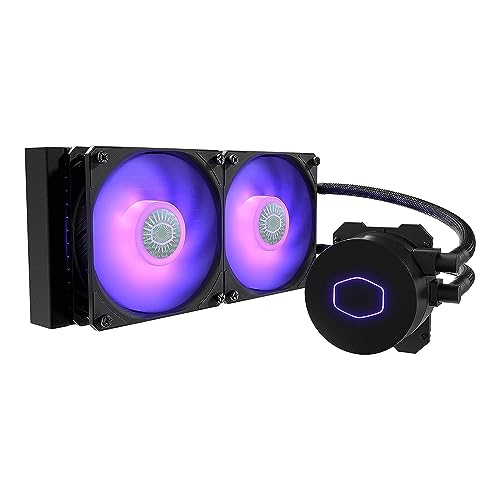
Let’s continue with the Cooler Master MasterLiquid ML240L V2 RGB AIO CPU Cooler, a liquid cooling system with a 240 millimeter radiator and 2 fans measuring 120 millimeters each. It fits cases that support this radiator size, with enough clearance for the fans and nearby motherboard components.
Inside, a third generation pump uses two chambers to guide the liquid through the block attached to your processor. The liquid carries heat to the radiator, where airflow from the fans helps release it. That’s how the system moves heat away while your computer runs.
Fan speed can be adjusted from 650 to 1,800 revolutions per minute. You can keep them running more slowly for lighter activities, like browsing or checking email, then increase airflow when your processor needs more cooling. You’re not stuck with one fan speed for every task.
The package includes thermal paste and mounting hardware for supported platforms. Thermal paste helps heat pass from the processor into the cooler. The hose connections on the block can also swivel, making it easier to point the tubes toward the radiator and arrange them inside your case.
Compatibility includes AMD AM4 and several Intel platforms. If your Intel motherboard uses an LGA 1700 processor socket, you’ll need a specific mounting adapter. Check whether your package includes it or whether you’ll need to buy it separately.
Rubber seals inside the pump help keep the liquid contained at the block’s connections. They’re designed to handle conditions inside the cooling circuit.
The block and fans also have color lighting with an included controller, so you can change effects even without a lighting connection on your motherboard. A compatible motherboard can handle those controls instead. This version uses conventional lighting with 4 pin connectors, rather than allowing each individual light to be controlled separately.
4. THERMALTAKE TH360 V2 AIO CPU COOLER

- Compatible Sockets – Intel LGA 2066/2011-3/2011/17…
- Sync with Motherboard RGB Software : Designed to s…
- Keep it COLD with Copper : The high-performance co…
Now let’s move on to the Thermaltake TH360 V2 ARGB Sync AIO CPU Cooler, which combines processor cooling with an illuminated block featuring an infinity mirror effect. It gives the lighting a sense of depth, adding a visual detail inside your computer.
Cooling comes from a 360 millimeter radiator and 3 fans measuring 120 millimeters each. Together, they release heat during gaming and demanding tasks. Your case needs to support that radiator size, with additional room for the fans and connections.
A copper base draws heat from the processor and transfers it into the liquid. The pump keeps that liquid moving and offers an adjustable speed of 1,500 to 3,300 revolutions per minute. That lets you tailor its operation to your setup instead of keeping it at full speed constantly.
The fans can also be adjusted through your motherboard. For everyday tasks, like browsing or writing documents, you can reduce their speed. When temperatures climb, increasing airflow helps carry more heat away. Setting up those controls gives you room to balance cooling with noise.
The hoses are about 18 inches long, providing some flexibility when positioning the radiator inside a compatible case. That helps when planning how the tubes will reach the processor block. They should follow a smooth path without tight bends or tension at the connections.
This model supports several Intel and AMD platforms, including some older setups. Before installation, check that your processor’s mounting socket is supported and use the matching bracket.
With a compatible motherboard, the lighting can match other components through its software. It uses a 3 pin, 5 volt connection to coordinate colors and effects. The mirror effect is decorative lighting, not a display, so this version doesn’t show temperature readings or play animations on the block.
5. ARCTIC LIQUID FREEZER III PRO 360 AIO CPU COOLER

- CONTACT FRAME FOR INTEL LGA1851 | LGA1700: Optimiz…
- ARCTIC’s P12 PRO FAN: More power at any speed – mo…
- NATIVE OFFSET MOUNTING FOR INTEL AND AMD: Shifting…
Finally, the ARCTIC Liquid Freezer III Pro 360 A-RGB AIO CPU Cooler helps cool your processor and the components nearby. A small fan on the block moves air over the parts that supply power to the processor, giving that area some airflow.
The main cooling setup combines a 360 millimeter radiator with 3 fans to release heat during games or demanding work. Your case needs to support that format and provide at least 63 millimeters of clearance for the radiator and fans together. That’s approximately 2.5 inches of thickness, so checking available space is important.
Fan speed can be adjusted to follow processor temperatures. Lighter tasks can use a slower setting, while heavier workloads can take advantage of faster airflow. This lets you balance cooling and noise based on how you use your computer, rather than keeping the fans at one speed.
The base sits slightly off center to bring it closer to the processor’s hottest area. It supports certain Intel and AMD platforms. On supported Intel systems, installation involves replacing the original processor retention mechanism with the included frame. Check compatibility and follow the mounting instructions for your platform.
Some preparation is already handled. The fans arrive installed and connected, and thermal paste is included to help transfer heat between the processor and the cooler. Cables integrated into the hose covering also help keep the inside of the case tidy.
For control, you can use one combined connection or adjust the pump and fan groups separately. The combined option simplifies wiring, while separate controls let you fine tune each part’s operation.
The black finish and customizable lighting offer another way to match your build. Synchronizing colors and effects with other components requires a compatible 3 pin, 5 volt lighting connection on your motherboard.
More deals of the day

Thanks for exploring the best AIO coolers with us. We hope this comparison helped you find a cooling system that fits your PC and your needs. With different radiator sizes, fan controls, and lighting options to consider, you can find a model that matches your setup and helps keep processor temperatures under control while you work or play.
Remember that at TechLife, you can explore detailed reviews of other PCs, tablets, and components. We encourage you to discover our different sections to improve your daily life with innovative and high-quality tech gear.
Visit us soon to find new buying guides, useful tips, and recommendations on a variety of products. We are here to help you make informed decisions and ensure that your shopping experience is as easy and satisfying as possible.