
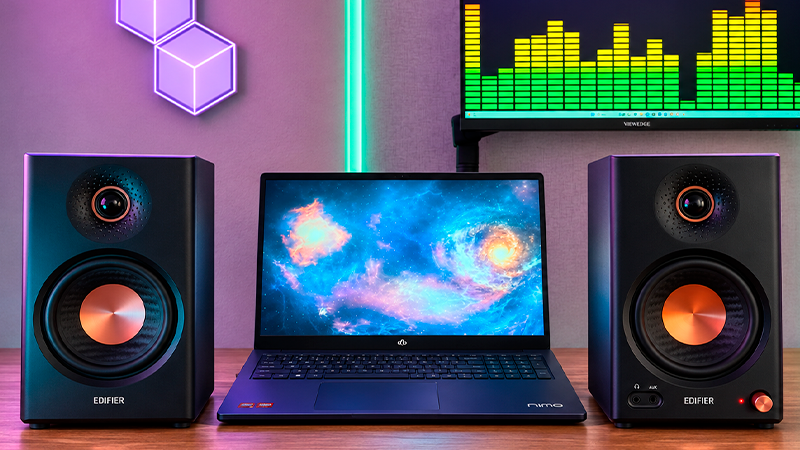
The right computer speakers can make music more enjoyable, movie dialogue easier to follow, and game sound effects more engaging. From compact desktop models to setups with a subwoofer or Bluetooth connectivity, there are options to match your available space and the way you like to listen.
This roundup explores a selection of the best computer speakers, highlighting their differences and the features that matter when comparing sound and connection options. Our recommendations can help you find speakers for work, music, and entertainment at your desk.
Deals of the Day
1. AUDIOENGINE A2 GEN3 SPEAKERS

- WHY CUSTOMERS CHOOSE A2+ – Real wood cabinets, cus…
- DESIGNED FOR DESKTOP LISTENING – Compact powered s…
- 24-BIT DAC & HI-RES AUDIO – Integrated digital-to-…
Let’s start with the Audioengine A2 GEN3 Speakers, a compact pair for enjoying music, videos, and games without crowding your desk. Each speaker stands about 6.1 inches tall and 4.2 inches wide, making it easier to fit them beside a monitor while leaving room for the rest of your setup.
The amplifier is built into one speaker, which connects to the other with a cable. That means you don’t need a separate amplifier. The pair delivers up to 60 watts of peak power. That’s its maximum output for brief moments, rather than a continuous power rating.
Inside each cabinet, a roughly 2.75-inch aramid fiber driver handles bass and midrange sounds, while a smaller silk tweeter handles higher notes. Splitting those jobs between separate components helps reproduce the different parts of voices, instruments, and game effects.
For a wired connection, USB C sends audio directly from your computer. The built-in converter turns that digital signal into sound and supports 24-bit playback. It also lets you connect without using your computer’s headphone jack, whether you’re watching a movie or playing a game.
Bluetooth makes switching to music from your phone convenient. It supports higher-quality streaming options that can adjust to wireless conditions, but your phone or other source needs compatible technology to use those features. Analog inputs also work with audio equipment, including a turntable with a preamp.
There’s a variable audio output for adding a powered subwoofer later. That gives you a way to extend the bass without replacing the speakers. The subwoofer is sold separately.
The hand-finished wooden cabinets are designed to reduce unwanted vibrations that could affect the sound. They’re built for close listening at a desk, and everyday operation doesn’t require an app or an account.
2. EDIFIER MR4 SPEAKERS

- TRUE STUDIO MONITOR – Based on the highly rated Ed…
- STUDIO QUALITY SOUND – The 1" silk dome tweeter an…
- FLEXIBLE CONNECTORS – 1/4" balanced TRS input, an …
Next up, we have the Edifier MR4 Speakers, a pair that lets you go from editing a recording to watching a movie at the same desk. They provide 42 watts of continuous power across 2 channels, with built-in amplification, so there’s no need for a separate amplifier.
Each cabinet combines a roughly 4-inch driver for bass and midrange sounds with a 1-inch silk tweeter for higher notes. The stated frequency range runs from 60 hertz to 20 kilohertz, covering the sounds that make up voices, instruments, and game effects.
What makes these useful for a mixed work and entertainment setup is the choice of 2 listening modes. Monitor mode aims for a more neutral presentation when checking recordings. Music mode adjusts the sound for everyday listening. You can switch between them using the front control, without installing software.
Around the back, separate bass and treble controls let you adjust the sound to your preferences and speaker placement. If the bass becomes too strong near a wall, you can turn it down. The main volume control stays within reach on the front.
Connections include inputs for audio interfaces and mixers, along with standard analog connections and a 3.5-millimeter auxiliary input. This is a wired setup. There’s no Bluetooth or USB audio input, so your computer or other source needs a compatible audio output.
A front headphone jack makes it easy to plug in headphones without reaching behind your computer. The fiberboard cabinets are designed to reduce unwanted vibrations that could affect what you hear.
Each speaker measures approximately 5.5 inches wide and 9 inches tall, with a depth of just under 8 inches. Leaving enough space on both sides of your monitor helps keep the pair comfortably positioned on your desk.
3. LOGITECH Z625 SPEAKERS

- Just testing
- The 200 Watts RMS/400 Watts Peak power of Logitech…
- Z625 Powerful THX Sound 2.1 speaker system provide…
Let’s continue with the Logitech Z625 Speakers, a setup for anyone who wants more bass when watching movies, playing games, or listening to music. It includes 2 speakers for either side of your monitor and a separate subwoofer, so you’ll need to leave room for that larger box.
Built-in amplification provides 200 watts of continuous power and up to 400 watts of peak power. Peak power refers to brief moments, not output the system maintains constantly. Of that continuous total, 130 watts go to the subwoofer and 35 watts to each desktop speaker. No separate amplifier is needed.
That arrangement gives explosions, soundtracks, and musical beats more low-end presence while keeping the left and right channels separate. It’s also THX certified, meaning it meets specific audio performance requirements. This is still a stereo system with a subwoofer, though. It doesn’t include rear speakers for surround sound.
Connecting more than one device is straightforward. There’s an optical digital input, along with RCA connections and 3.5-millimeter audio inputs. You can keep up to 3 compatible devices connected, which saves you from unplugging cables whenever you switch between your computer and another source.
The power, volume, and bass controls sit on the right speaker, keeping everyday adjustments within reach. You can turn the bass down when focusing on dialogue or give it more presence during an action movie, without opening an app. That speaker also has an auxiliary input and a headphone jack. The volume knob adjusts headphone volume, too.
An optical cable and a 3.5-millimeter audio cable are included, covering those common connection options. Both desktop speakers connect to the subwoofer, and the system plugs into a wall outlet. Planning space for the box and its cables will help keep your desk area organized.
4. PRESONUS ERIS 3.5 SPEAKERS

- HONEST. Eris 3.5 near field studio monitors delive…
- EXPRESSIVE. Clear, accurate audio with a big low e…
- POWERFUL. Compact speakers that pack a punch — 50 …

Now let’s move on to the PreSonus Eris 3.5 Speakers, a pair for listening to music at your desk or checking audio while editing videos. They have 50 watts of built-in amplification shared between the 2 channels, so you don’t need to buy a separate amplifier.
Each cabinet uses a roughly 3.5-inch driver for bass and midrange sounds, plus a 1-inch silk tweeter for higher notes. Together, they handle voices, instruments, and game effects. For the deepest bass, you’ll need an additional subwoofer, especially if you want more impact from explosions or bass-heavy music.
You can adjust the sound using separate bass and treble knobs. These help you fine-tune the balance based on where the speakers sit. If placing them near a wall makes the bass too strong, for example, you can turn it down without opening an app.
Connecting to your computer requires a cable. There’s a 3.5-millimeter auxiliary input, standard analog connections, and balanced inputs for audio interfaces or mixers. This version doesn’t include Bluetooth or accept audio through USB, so your source needs a compatible audio output.
When you want to listen without disturbing anyone, plug headphones into the front headphone jack. The speakers automatically mute, and the same volume knob controls your headphones. It’s a way to switch to private listening without reaching behind your computer.
Each cabinet is about 8.3 inches tall and 5.6 inches wide. That gives you a measurement to check before placing them on either side of your screen. The enclosures are made from fiberboard with a vinyl covering.
Power-saving mode activates after 40 minutes without audio, useful if you leave them on after working. Built-in protection also helps guard against overheating and sudden electrical changes when switching the system on or off.
5. EDIFIER M60 SPEAKERS

- [Compact and Delicate Design] Measuring 100mm (W) …
- [Powerful Output] The M60 has a total output power…
- [High-Quality Audio Processing] Experience high-re…
Finally, the Edifier M60 Speakers offer a compact setup for music, movies, and games without taking over your desk. With 66 watts of continuous power and built-in amplification, they don’t require a separate amplifier, keeping the number of boxes on your desk down.
Each cabinet pairs a 3-inch aluminum driver for bass and midrange sounds with a 1-inch silk tweeter for higher notes. Digital processing divides the sound between them and manages changes in level during playback.
For a direct computer connection, USB C carries the audio over a cable. There’s also a 3.5-millimeter auxiliary input for devices with a headphone output. Either option lets you enjoy a movie or play a game without relying on a wireless connection.
Bluetooth 5.3 makes it easy to stream from your phone without plugging it into the speakers. With compatible devices, wireless playback supports up to 24-bit audio at 96 kilohertz. The pair also carries high-resolution audio certifications for wired and wireless use. Those features don’t improve the recording itself, though. What you hear still depends on the source material and the device sending it.
Each speaker measures approximately 3.9 inches wide, 6.6 inches tall, and 5.8 inches deep. That small footprint makes it easier to place one on either side of your monitor while keeping the left and right audio channels separate.
The included aluminum stands tilt the speakers upward by 15 degrees, directing sound toward your ears when they’re sitting on a desk. You won’t need to buy additional bases to get that angle.
Controls sit on a touch-sensitive top panel. Its lighting comes on as your hand approaches and turns off automatically afterward. The companion app provides additional settings, letting you adjust the setup to your listening preferences.
More deals of the day


Thanks for exploring the best computer speakers with us. We hope this roundup helped you find the right speakers for your desk and listening preferences. With options offering different sizes, connections, and sound features, there’s plenty to consider for music, movies, gaming, and everyday use.
Remember that at TechLife, you can explore detailed reviews of other audio products. We encourage you to discover our different sections to improve your daily life with innovative and high-quality sound devices.
Visit us soon to find new buying guides, useful tips, and recommendations on a variety of products. We are here to help you make informed decisions and ensure that your shopping experience is as easy and satisfying as possible.