
Keeping up with a fast lecture or a detailed interview can be tricky. Digital voice recorders let you capture what’s said and listen back at your own pace. Options range from compact models with simple controls to recorders with noise reduction, voice activation, and expandable storage.
This roundup covers the best voice recorders for classes, interviews, and meetings. You’ll be able to compare recording quality, battery life, and ease of use, with recommendations that help you find a model that fits your routine.
Deals of the Day
1. SUNLAN VOICE RECORDER
- 【Simple Operation】- switch on your voice recorder,…
- 【Clear Voice Record】- high quality recording with …
- 【Voice Activated Recording】- automatic voice reduc…
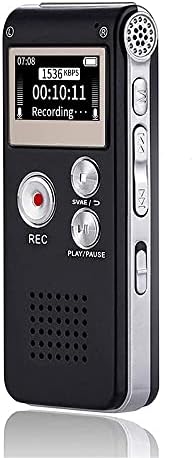
Let’s start with the Sunlan 8541723710 Voice Recorder, which lets you repeat a phrase while you transcribe it. You can mark where a section starts and ends, then let it play on a loop. That’s handy for checking a number or writing down an answer without searching through the recording each time.
Once it’s powered on, separate buttons handle recording, stopping, and playback. After an interview response, you can stop and listen to it before moving on to the next question.
The sensitive microphone picks up voices, while noise reduction helps cut down on background sound. Recordings are saved as WAV files, which you can copy to your computer later. There’s also a sound-activated mode that starts recording when it detects audio and goes into standby during silence. For conversations with long pauses, that means fewer quiet sections to sit through afterward.
According to the listing, the rechargeable battery provides more than 30 hours of continuous recording or about 7 hours of playback per charge. The included USB cable lets you recharge it from a computer and transfer your recordings through the same connection.
Its 16 gigabytes of storage hold up to 199 recordings. On a Windows computer, it appears as a removable drive, so moving an interview to a project folder is as simple as dragging the file over. You can also use available storage for documents or photos.
The built-in speaker lets you check a recording right on the device. For private listening, the 3.5 millimeter jack accepts headphones, or you can connect an external speaker to share the audio. Between sessions, it also works as an MP3 player for music you’ve copied over from your computer.
2. EVISTR L357 VOICE RECORDER

- Uncomparable Recording Quality: After the new upgr…
- Memory Doubled-64GB High Capacity: L357 small audi…
- Easy to Operate & Powerful: EVISTR digital recorde…
Next up, we have the EVISTR L357 Voice Recorder, which lets you schedule when a recording starts and stops. That’s useful for a planned lecture or meeting. For longer sessions, it can automatically split the audio into files lasting 30, 60, 90, or 120 minutes, making it easier to work through a session in sections.
The microphone picks up sound from all directions and has 7 sensitivity settings. A lower setting works for someone speaking nearby, while a higher one helps pick up a speaker farther away in a classroom. Noise reduction helps soften background sound. The sound-activated recording mode has its own 7 detection levels and pauses during quiet stretches until it detects audio again.
With 64 gigabytes of storage, it holds up to 4660 hours using the MP3 setting that takes up the least space. Higher quality settings use more storage, and there’s a WAV option for keeping more audio detail. According to the listing, the battery delivers up to 32 hours of recording or 35 hours of playback. A full charge takes about 3 hours with the included USB C cable.
When it’s time to review your notes, you can slow down a response to catch the wording or speed up a lecture to get through it faster. The repeat function lets you mark the beginning and end of a phrase and loop that section while you transcribe. You can listen through the built-in speaker or plug in headphones.
Each file is named with its recording date and start time, helping you find the right interview when you’ve recorded several in one day. The charging cable also transfers recordings to a Windows computer or Mac, so you can edit, share, or archive them.
3. OM SYSTEM WS-883 VOICE RECORDER

- The digital voice recorder with high-quality built…
- Intelligent Auto Mode adjusts the recording level …
- A built-in USB terminal allows you to directly con…
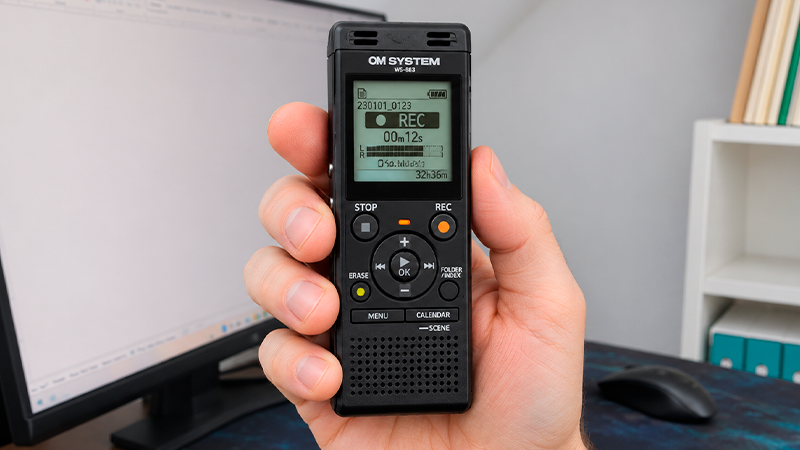
Let’s continue with the OM SYSTEM WS-883 Voice Recorder, which captures conversations around a table with 2 microphones angled at 90 degrees. Its low frequency filter helps reduce hum from things like air conditioning. You can record in stereo or choose an uncompressed mono format, which saves the audio as a single channel.
During a meeting, automatic sensitivity adjustment adapts to people speaking at different volumes. There’s also a sound-activated mode that starts recording when audio rises above your chosen level and goes into standby during pauses. That helps cut down on silent stretches when reviewing a conversation later.
The 8 gigabytes of internal storage hold about 130 hours in stereo or up to 2080 hours in the mono setting that uses the least space. You can add a micro SD card of up to 32 gigabytes. In that same mono setting, the included rechargeable batteries provide up to 68 hours of recording. With 2 alkaline batteries, the advertised runtime reaches about 110 hours.
Playback includes a voice balancer that brings up quieter voices, plus noise cancellation to help make speech easier to follow. You can slow a recording to half speed while transcribing, play it at double speed to review a lecture, or loop a section until you’ve caught the wording.
Finding a particular session is straightforward, too. Calendar search lets you browse recordings by date, and each file supports up to 99 markers for jumping to specific moments. You could mark an interview answer you’ll need to quote later.
The simple mode uses larger text and keeps common settings within reach. When you’re ready to move recordings to a computer, the built-in USB connector handles file transfers without a separate cable. It also recharges the included batteries inside the recorder.
4. LIEBSSEN V75 VOICE RECORDER
- 【HD Audio Dictaphone & Versatile Applications】This…
- 【High Cost-Effective】With 8GB of memory, this port…
- 【One-Button Recording and Saving】Simply slide the …
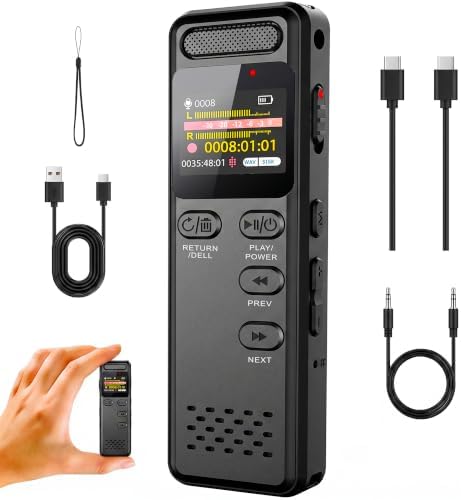
Now let’s move on to the Liebssen V75 Voice Recorder, which starts recording with a slide of its side switch, even when it’s turned off. That’s handy when an interview begins before you’re ready. Slide it to the save position to finish the recording. There’s also a button lock to prevent accidental presses from interrupting your session.
Noise reduction helps soften background sound, and you can adjust recording quality depending on what you’re capturing. At the highest setting, the 8 gigabytes of internal storage hold about 6 hours of audio. For longer sessions, you can add a micro SD card or choose a lower quality setting so each file takes up less space.
The listing advertises up to 110 hours of continuous recording per charge. If the battery runs low during a session, the recorder saves the current file before shutting down. When it needs charging, you can use the included USB C cable.
Finding a particular answer is easier with fast forward and rewind. Once you’ve located it, you can mark the beginning and end of that section and play it on a loop while you transcribe. Between interviews or classes, it also works as an MP3 player for listening to music.
You can connect an external microphone and place it closer to the person speaking while leaving the recorder on the table. The 3.5 millimeter headphone jack lets you check the audio privately before moving on to your next question.
Its metal body weighs about 2.8 ounces and measures just under 4 inches long, making it small enough to slip into a pocket. The color screen lets you choose a recording or check settings directly on the device, and the menu offers several language options.
5. HOTIYAN H-10001 VOICE RECORDER

- Digital Recorder: The upgraded digital recorder is…
- Voice controlled tape recorder: Recording equipmen…
- 8GB Capacity and Rechargeable Battery:Built-in 8GB…
Finally, the HoTiyan H-10001 Voice Recorder is a pocket-sized option for taking to class, weighing about 1.6 ounces. Once it’s turned on, separate buttons let you start recording, stop and save, or play back a file. When an interview gets going, you can start capturing it with a single press.
Its built-in stereo microphone picks up voices, while noise reduction helps soften background sound. For an interview, you can place it between both speakers to capture their responses. Sound activation pauses recording when the volume drops and resumes when it rises above your chosen level. You can adjust that threshold to help quieter voices trigger recording, too.
The 8 gigabytes of internal storage support up to 199 files. According to the listing, that’s about 128 hours at the highest quality setting or up to 560 hours at the setting that uses the least space. Battery life is rated at up to 20 hours of continuous recording or 8 hours of playback through headphones. The included micro USB cable handles charging.
Reviewing a lecture is easier with adjustable playback speed. You can speed through familiar material or slow down an explanation that’s hard to follow. For transcription, mark where an answer begins and ends, then let that section repeat. That keeps the words playing while you type, without having to rewind after every sentence.
Each recording’s filename includes its date and time, helping you find the right conversation after a day of interviews. You can also set a password to limit access to the device. When you’re ready to organize your recordings, the charging cable transfers MP3 or WAV files to your computer. It also lets you copy music onto the recorder for listening between sessions.
More deals of the day


Thanks for exploring the best voice recorders with us. We hope this roundup helped you find the right recorder for your classes, interviews, or meetings. With options offering simple controls, noise reduction, and different battery runtimes, you can choose a model that makes recording and reviewing conversations easier.
Remember that at TechLife, you can explore detailed reviews of other audio products. We encourage you to discover our different sections to improve your daily life with innovative and high-quality sound devices.
Visit us soon to find new buying guides, useful tips, and recommendations on a variety of products. We are here to help you make informed decisions and ensure that your shopping experience is as easy and satisfying as possible.